ձ, ծ and ց
Hear the contrast, find each printed shape, then read and retrieve the words.
About this unit
ձ, ծ and ց are joined sounds: a t-like start released straight into a hiss. They follow the familiar three-way pattern.
- ձ
 throat buzzesձու · egg
 - Ծծ
 no puff of airծով · sea
 - Ցց
 puff of airցուլ · bull
Reading tips
These are joined consonant sounds (affricates): start with a closure and release into friction. The three-way contrast returns: ձ / ծ / ց and ջ / ճ / չ.
You have now met the full modern alphabet. Keep each joined consonant sound together when blending a word.
Reading practice
The ts-family
Listen to the three models first. Then: which one is the mystery sound?
Listen first
The ts-family
Listen to the three models first. Then: which one is the mystery sound?
Listen first
The ts-family
Listen to the three models first. Then: which one is the mystery sound?
Listen first
Letters in words
Match each letter to the highlighted letter.
Find the sound
Match the sounds to the letters.
A familiar capital outline
Match the related capital and lowercase shapes.
Read with support
Match the words to their pictures.
Read without a sound cue
Match the words to their pictures.
Sound to spelling
Listen. Choose the spelling.
Spelling to sound
Read the word. Choose its sound.
Sound to spelling
Listen. Choose the spelling.
Hear the trained contrast
Listen to the practice syllable. Choose its spelling.
Build the word
Listen and build the word in typing order.
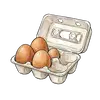
Build the word
Listen and build the word in typing order.

Build the word
Listen and build the word in typing order.

Recall the spelling
Listen and build the word without its picture.
Recall the spelling
Listen and build the word without its picture.
Recall the spelling
Listen and build the word without its picture.
Finish practice to save this unit.
You can read and write this
Hear the contrast, find each printed shape, then read and retrieve the words.

ձու
egg
ծով
sea
ցուլ
bullUse a Armenian keyboard
On your phone, add Armenian in Settings → Languages or Keyboards. On a computer, add an Armenian input language in the operating system settings.
Use the on-screen letters whenever you prefer. The ու key inserts its two written characters together; spaces and punctuation have their own keys.
 LernLaterne